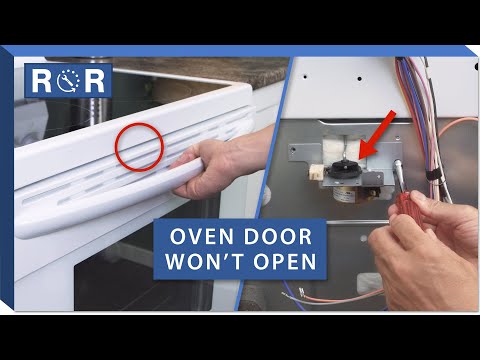
Oven Door Won't Unlock - Troubleshooting
Oven Door Stuck? Here's How to Unlock It After Self-Cleaning or a Glitch!
There are few things more frustrating than finding your oven door stubbornly locked, especially when you're ready to cook. This common issue often arises after a self-cleaning cycle, a power outage, or sometimes for seemingly no reason at all. Don't panic! While it can be annoying, many times a stuck oven door can be resolved with a few simple troubleshooting steps. As experts in appliance parts and repair, we're here to guide you through the process.
Why Is My Oven Door Locked? Common Scenarios
Before diving into fixes, it helps to understand why your oven door might be locked in the first place:
- After a Self-Cleaning Cycle: This is the most frequent culprit. Ovens automatically lock the door during self-cleaning to prevent injury from extreme temperatures. The door should remain locked until the oven has cooled down to a safe temperature, usually below 200-300°F (93-149°C).
- Power Outage or Surge: An interruption in power can sometimes cause the control board to glitch, leaving the door locked even if the cleaning cycle isn't active.
- Control Panel Error: A minor electronic malfunction can confuse the oven's system, leading it to believe it needs to keep the door locked.
- Mechanical Latch Failure: Less common, but possible. The latch mechanism itself might be broken, jammed, or worn out.
Troubleshooting Steps for a Locked Oven Door
1. Is the Self-Clean Cycle Still Active or Cooling Down?
If your oven door is stuck after a self-clean cycle, this is often the culprit. Check your oven display for a "LOCK" light, a remaining clean time, or any indication that the cleaning cycle is still in progress or that the oven is still cooling. Many ovens will not unlock until the internal temperature has dropped to a safe level, which can take several hours after a full cleaning cycle.
- Wait it Out: Be patient. Allow the oven plenty of time to cool completely. This could be anywhere from 30 minutes to 2-3 hours depending on the oven and how recently the cycle finished.
- Attempt to Cancel: If your oven display shows a remaining clean time or a "LOCK" indicator, try pressing the "CANCEL" or "CLEAR/OFF" button. Sometimes, simply pressing this button can prompt the oven to finish its cool-down process and unlock.
For a visual guide on these initial steps for certain models, you can refer to this helpful video: How to Fix an Oven Door That Won't Unlock After Self Cleaning.
2. Power Cycle Your Oven (The "Appliance Reboot")
Just like your computer, an oven's control board can sometimes benefit from a hard reset. This simple step can often clear minor electronic glitches:
- Turn Off the Breaker: Locate your home's circuit breaker box and find the breaker that controls your oven. Flip it to the "OFF" position.
- Wait: Leave the power off for at least 5-10 minutes. This allows the control board to fully discharge and reset.
- Restore Power: Flip the breaker back to the "ON" position.
- Check the Door: After the oven powers back on, listen for any sounds of the latch retracting, and then attempt to open the door.
3. Check for Error Codes
Many modern ovens will display an error code if there's a specific issue. If your oven has a digital display, look for any numbers or letters flashing. Consult your oven's owner's manual to decipher the code. An error code related to the door lock or temperature sensor could point to the root cause.
4. Examine the Latch Mechanism (External Check)
Sometimes, a simple obstruction can prevent the latch from moving freely. While you should never force the door open, you can do a quick visual check:
- Look for Obstructions: Peer into the gap around the oven door. Is there anything visible, like a piece of food, foil, or a dropped utensil, preventing the latch from disengaging?
- Clean Around the Latch: Use a flashlight to inspect the area where the latch mechanism engages. Gently clear away any debris you can reach.
Warning: Do not attempt to force the door open, as this can severely damage the latch and the oven door itself, leading to more costly repairs.
5. Manual Release (Advanced & Caution Advised)
Some oven models *may* have a manual release lever for the door latch. However, this is rare for user access and often requires partial disassembly of the appliance or access to internal components. Attempting this without proper knowledge or tools can be dangerous and could void your warranty.
If you are comfortable with advanced troubleshooting and understand the risks, the linked video (How to Fix an Oven Door That Won't Unlock After Self Cleaning) demonstrates how to access and manually manipulate the latch mechanism on a specific GE model (starting around the 2:00 mark). This involves opening the control panel and using tools to move the latch. We strongly recommend consulting a qualified technician for internal repairs, as working with electrical components carries a risk of shock and damage.
When to Call a Professional
If you've tried all the troubleshooting steps above and your oven door remains stubbornly locked, it's time to call in the experts. Here are situations where professional help is recommended:
- Internal Component Issues: If the problem lies with the door lock motor, the control board, or other internal wiring, these are complex repairs best left to certified technicians.
- No Visible Solution: If there's no error code, no visible obstruction, and power cycling didn't work, a deeper diagnostic is needed.
- Safety Concerns: If you're uncomfortable performing any of the troubleshooting steps, or if you suspect an electrical issue, always prioritize your safety and call a professional.
Get Your Oven Back in Action!
A locked oven door can put a damper on meal plans, but with these troubleshooting tips, you stand a good chance of resolving the issue yourself. Remember, safety first! If the problem persists or requires internal component access, our team of experienced technicians is ready to provide reliable and efficient appliance repair services to get your oven door unlocking smoothly again.