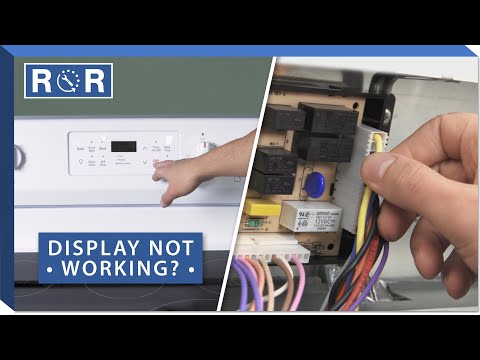
Oven Display Isn't Working - Troubleshooting
Oven Display Gone Blank? Troubleshooting Your Dark Oven Screen
There's nothing quite as frustrating as stepping into the kitchen, ready to preheat your oven for tonight's dinner, only to be met with a blank, dark display. No numbers, no clock, no temperature – just an empty void. A non-functional oven display doesn't just look bad; it can make your appliance practically unusable, preventing you from setting temperatures, timers, or even starting a cycle.
Before you panic and call for a costly repair, many common display issues can be diagnosed and sometimes even fixed with a bit of troubleshooting. As appliance experts, we're here to guide you through the process. Let's shed some light on why your oven display might be dark and how you can get it working again!
Common Reasons Your Oven Display Might Fail
A blank oven display can stem from various issues, ranging from simple power problems to more complex electronic failures. Understanding the potential culprits can help narrow down your diagnosis:
- Power supply interruptions (tripped breaker, loose plug)
- Control lockout or demo mode activation
- Loose or damaged ribbon cables connecting components
- A faulty main control board (the oven's "brain")
- A defective display panel itself
- Overheating or internal component failure
Start Simple: Power and Basic Checks
Before diving into internal components, always start with the basics. You'd be surprised how often a simple power issue is the culprit.
Is Your Oven Getting Power?
- Check the Plug: Ensure your oven is securely plugged into the wall outlet. Sometimes, vibrations or accidental bumps can loosen the plug.
- Circuit Breaker: Head to your home's electrical panel. Look for a tripped breaker – it will usually be in the "off" position or somewhere between "on" and "off." Flip it completely off, then firmly back to the "on" position. If it immediately trips again, there's a more serious electrical issue, and you should call an electrician.
- GFCI Outlets: If your oven is connected to a Ground Fault Circuit Interrupter (GFCI) outlet (common in kitchens), check if it has tripped. Press the "reset" button on the outlet.
Control Lockout or Demo Mode
Modern ovens come with various features that can mimic a non-working display. Check your owner's manual for specific instructions on your model, but generally:
- Control Lockout: This feature prevents accidental use. Look for a button labeled "Lock," "Control Lock," or an icon of a padlock. Hold it down for 3-5 seconds to see if the display reactivates.
- Demo Mode (Showroom Mode): Designed for display in stores, this mode powers the control panel but prevents the heating elements from turning on. It might also dim or disable the display. Look for instructions in your manual on how to exit "Demo Mode." This usually involves a combination of button presses.
The Control Board: The Brain of Your Oven
If basic checks don't resolve the issue, the problem often lies with the main control board, also known as the Electronic Range Control (ERC). This component manages all of your oven's functions, including the display.
A faulty control board can manifest in many ways, from a completely blank display to erratic readings or unresponsive buttons. Issues can arise from power surges, age, or internal component failure.
To visually understand how to access and inspect your oven's control board and related components, we highly recommend watching this helpful video: Oven/Range Control Panel Display Not Working? - 4 Easy Fixes. It provides excellent visual guidance for safely navigating the internal parts of your oven's control panel.
While replacing a control board is a more advanced DIY task, it's often simpler than you might think, especially with clear instructions. However, always remember to disconnect power to the appliance before attempting any internal repairs.
Ribbon Cables and Connections
The display panel communicates with the main control board via delicate ribbon cables. Over time, these connections can become loose, corroded, or even damaged, leading to an unresponsive or blank display.
After safely accessing the control panel area (as demonstrated in the video mentioned above), carefully inspect these cables. Ensure they are firmly seated in their connectors. If you see any signs of burning, fraying, or corrosion, the cable may need to be replaced.
Even if they look fine, gently reseating them can sometimes resolve an intermittent connection issue. Be extremely careful, as these cables are fragile.
The Display Panel Itself
While less common than a control board failure, the display panel itself can sometimes be the root cause. If you've ruled out power issues, the control board, and ribbon cables, and all other oven functions (like the oven light or burner ignitors) seem to work perfectly, the display unit might be defective.
This typically requires replacing the entire display module. This part is often integrated with the control board or a separate component that plugs into it. Consult your oven's parts diagram (usually found online by searching your model number) to identify the correct replacement part.
When to Call a Professional
While many of these troubleshooting steps are DIY-friendly, there are times when it's best to call in the experts:
- If you're uncomfortable working with electrical components.
- If you've tried all the basic troubleshooting steps and the display is still blank.
- If you suspect a complex electrical issue (e.g., circuit breaker keeps tripping).
- If replacing parts like the control board or display panel seems too daunting.
Appliance repair technicians have the specialized tools and knowledge to quickly diagnose and safely repair your oven, ensuring it's back to perfect working order without risk to you or your appliance.
Get Your Oven Display Back in Action!
A non-working oven display can be a major inconvenience, but with a bit of systematic troubleshooting, you can often pinpoint the problem. From simple power checks to inspecting internal components like the control board and ribbon cables, there's a good chance you can either fix it yourself or at least understand the issue before calling for professional help.
Remember, safety first! Always unplug your oven before performing any internal inspections or repairs. If you need replacement parts for your oven, or if you're ready to schedule a professional repair, don't hesitate to contact us or browse our extensive selection of oven parts.