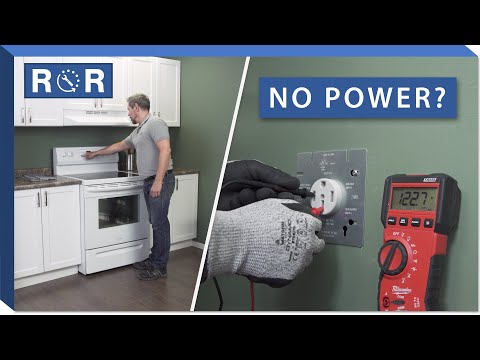
No Power? Electric Range Troubleshooting
Electric Range Dead? How to Troubleshoot When Your Stove Has No Power
There's nothing quite as frustrating as stepping into the kitchen, ready to cook, only to find your electric range completely lifeless. No lights, no heat, just a silent, unresponsive appliance. While a "dead" range can seem like a major problem, often the solution is simpler than you think. Before you panic and call for an expensive service visit, let's walk through some common troubleshooting steps to get your electric stove humming again.
At [Your Company Name], we understand the inconvenience of a broken appliance. That's why we're here to help you diagnose the issue and, if needed, provide the parts and expertise to fix it. Let's dive in!
Safety First: Always Prioritize Your Well-being
Before you begin any inspection or troubleshooting, it's crucial to prioritize safety. Dealing with electricity can be dangerous if not handled properly. Always:
- Unplug the range from the wall outlet if it's accessible.
- If unplugging isn't possible (many ranges are hardwired or too heavy to move easily), go to your home's main electrical panel and turn off the circuit breaker(s) dedicated to your range. Look for breakers labeled "Range," "Stove," or "Oven."
- Never work on an appliance that is still connected to power.
Step 1: Check Your Power Supply – The Most Common Culprit
A surprising number of "dead" appliance issues stem from the power supply. Don't overlook these basic checks:
Is it Plugged In?
While it sounds almost too simple, ensure your range's power cord is fully and securely plugged into the wall outlet. Sometimes, a slight nudge during cleaning or moving can dislodge it.
The Circuit Breaker or Fuse Box
This is by far the most common reason an electric range loses power. Electric ranges draw a lot of current, and if there's a surge, a short, or just too many appliances running simultaneously on the same circuit, the breaker can trip. Go to your home's main electrical panel and look for a tripped breaker. A tripped breaker usually sits in an "off" or "middle" position, not fully "on."
To reset it: First, firmly push the breaker all the way to the "OFF" position, then firmly push it back to the "ON" position. If your home uses fuses, check if any have blown and replace them with fuses of the correct amperage.
For a visual guide on checking and resetting your circuit breaker, we highly recommend watching this helpful video: Electric Range Dead? How to Troubleshoot When Your Stove Has No Power. The video offers excellent demonstrations starting from the very beginning of the troubleshooting process.
Test the Outlet (If Possible)
If the breaker isn't tripped or immediately trips again after resetting, the issue might be with the outlet itself. If you have a voltage tester or multimeter and are comfortable using it, you can test the outlet to ensure it's receiving power. Alternatively, if you have another high-power appliance (like a large microwave or dryer) that uses a similar 240V outlet, you could try plugging it in (carefully!) to see if it powers on. However, for safety, using a voltage tester is preferred.
Step 2: Inspect the Range's Internal Connections
If your power supply seems fine, the problem likely lies within the range itself. Remember to ensure the power is OFF before proceeding!
The Terminal Block
The terminal block is where your range's power cord connects to the appliance's internal wiring. It's usually located on the back of the range, behind a removable access panel. Carefully remove the panel (you might need a screwdriver) and inspect the terminal block. Look for:
- Loose Wires: Ensure all wires are securely fastened to the terminal block. Tighten any that appear loose.
- Burnt or Scorched Wires/Terminals: Evidence of burning or melting indicates a serious electrical issue. This often happens if the connections were loose, causing resistance and heat. If you see this, replacement of the terminal block and potentially the power cord (or even a professional repair) is necessary.
The video referenced earlier (https://www.youtube.com/watch?v=wZwxewn2w44) also provides clear instructions and visuals on how to access and inspect the terminal block, which can be very helpful for DIYers.
Internal Wiring and Control Board
After checking the terminal block, follow the main power wires into the range as far as you can reasonably see. Look for any signs of:
- Chewed Wires: Rodents can sometimes cause damage.
- Pinched or Severed Wires: Caused by moving the range or internal components shifting.
- Burnt Spots on the Control Board: The main control board (often located behind the control panel or oven cavity) manages all the range's functions. If it has visible burn marks, a bulging capacitor, or smells burnt, it's likely failed and needs replacement. This is a more complex repair and might require professional assistance, though replacement control boards are available.
When to Call a Professional
While many "no power" issues can be resolved with the steps above, there are times when professional help is essential:
- If you're uncomfortable working with electricity or opening up your appliance.
- If you find extensive burning or melting of wires/components.
- If the circuit breaker repeatedly trips immediately after being reset, indicating a short circuit.
- If you've performed all the basic checks and the range still has no power.
Get Your Range Cooking Again!
A dead electric range can disrupt your entire household, but with a systematic approach to troubleshooting, you can often pinpoint the problem yourself. Remember to always prioritize safety and disconnect power before any inspection. If you find a faulty part, such as a terminal block or control board, [Your Company Name] has a wide selection of genuine replacement parts to get your range back in working order. Don't hesitate to reach out to our experts for guidance or to find the right part for your specific model!