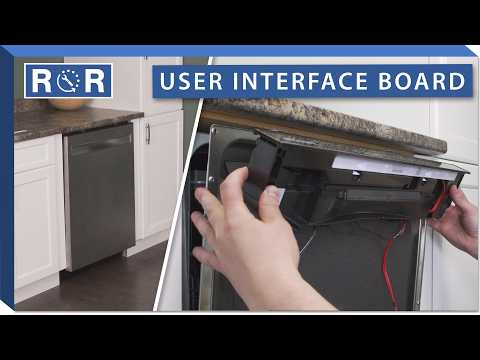
Dishwasher User Interface Board
Is Your Dishwasher Acting Up? It Might Be the User Interface Board!
Modern dishwashers are marvels of convenience, taking the chore out of dishwashing. But when your trusty appliance starts behaving erratically – flashing strange lights, refusing to start, or simply not responding to your commands – the culprit could very well be its brain: the user interface (UI) board. Understanding this crucial component can save you a lot of frustration and potentially a service call.
What Exactly is a Dishwasher User Interface Board?
Think of your dishwasher's user interface board as its communication center. It's the electronic panel you interact with every time you select a cycle, press start, or activate an option. Located typically on the top edge of the dishwasher door or on the front panel, it houses buttons, touchpads, LED displays, and the underlying circuit board that translates your input into commands for the main control board. While often confused with the main control board, the UI board's primary role is to receive user input and display information, acting as the bridge between you and the machine's complex operations.
Common Symptoms of a Failing UI Board
A malfunctioning user interface board can manifest in several ways, often leading to a non-functional dishwasher. Here are some tell-tale signs:
- Unresponsive Buttons/Touchpad: You press a button, and nothing happens, or only some buttons work.
- Garbled or Flickering Display: The LED or digital display shows jumbled characters, partial numbers, or flickers inconsistently.
- Random Cycle Changes: Your dishwasher unexpectedly switches cycles or starts functions on its own.
- Dishwasher Won't Start: Despite pressing the start button, the dishwasher remains dormant.
- Error Codes: While error codes can point to various issues, some specifically indicate a problem with the UI board or its communication with the main control board.
- Intermittent Problems: The dishwasher works sometimes, but not always, suggesting a failing connection or component on the board.
Why Do Dishwasher UI Boards Fail?
Like any electronic component in an appliance, user interface boards can succumb to various issues over time:
- Age and Wear: Components on the circuit board can degrade, solder joints can crack, and membranes under touchpads can wear out.
- Moisture Damage: Dishwashers are wet environments. While sealed, prolonged exposure to steam, leaks, or even high humidity can corrode circuits.
- Power Surges: Electrical spikes can fry sensitive electronic components on the board.
- Physical Damage: Accidental impacts or excessive force on buttons can damage the internal mechanisms.
- Manufacturing Defects: Rarely, a board might have an inherent flaw that causes premature failure.
Troubleshooting Your Dishwasher UI Board
Before jumping to conclusions, a few basic troubleshooting steps can help:
- Power Cycle: Unplug the dishwasher or flip its circuit breaker off for a few minutes, then restore power. This can reset the electronics.
- Check for Visual Damage: Carefully inspect the control panel for signs of physical damage, cracks, or burnt areas.
- Consult Your Manual: Look up any error codes displayed on your panel in your dishwasher's user manual.
For those comfortable with a bit more hands-on work, accessing the UI board might be necessary. The YouTube video "How To Replace A Dishwasher Control Panel / User Interface" provides an excellent visual guide on how to safely open the dishwasher door panel and access the UI board for inspection or replacement on a specific model. While your dishwasher might differ, the video offers valuable insights into the general process of disassembly and reassembly. Remember to always disconnect power before attempting any internal repairs!
Can You Replace a Dishwasher UI Board Yourself?
For many DIY-savvy homeowners, replacing a dishwasher user interface board is a manageable repair. The process typically involves disconnecting power, carefully detaching the inner door panel, unscrewing the old board, disconnecting wiring harnesses, and installing the new one. The video referenced above demonstrates this process. However, it's crucial to:
- Prioritize Safety: Always unplug the dishwasher or turn off the circuit breaker before starting any work.
- Document Disassembly: Take photos or notes of wire connections and screw locations.
- Use the Correct Part: Ensure you order the exact replacement part number for your specific dishwasher model.
If you're uncomfortable working with electrical components or disassembling appliances, calling a professional appliance repair technician is always the safest and most reliable option.
When to Replace Your Dishwasher UI Board
If troubleshooting steps haven't resolved the issue, and you've confirmed (perhaps with the help of a technician or by ruling out other components) that the UI board is indeed the culprit, then replacement is the next logical step. Given the relatively contained nature of the repair and the often-affordable cost of the part compared to a new dishwasher, replacing the UI board is typically a cost-effective solution.
Finding the Right Replacement Part
To ensure a successful repair, you absolutely must purchase the correct user interface board for your specific dishwasher model. You'll find your model number on a sticker usually located along the inner edge of the dishwasher door, on the side of the tub, or sometimes on the kickplate at the bottom. With this number, you can easily find compatible replacement parts through appliance parts retailers.
Get Your Dishwasher Back in Command!
A malfunctioning user interface board can bring your dishwashing routine to a grinding halt. By understanding its function, recognizing the symptoms of failure, and knowing your options for troubleshooting and replacement, you can get your dishwasher responding to your commands once again. Whether you choose to tackle the repair yourself or call in a pro, getting the right part is key to restoring your appliance's full functionality. Happy dishwashing!