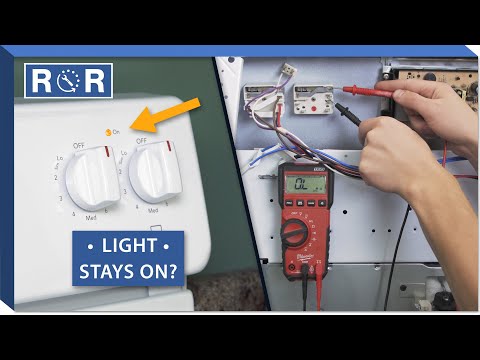
Cooktop Indicator Light Stays On - Troubleshooting
There’s nothing quite like the convenience of a modern cooktop, making meal preparation a breeze. But when that “Hot Surface” or burner indicator light decides to stay on long after you’ve finished cooking, it can be a source of confusion and even worry. Is it still hot? Is something broken? Is it a safety hazard?
Don't panic! While a persistent indicator light can be annoying, it's often a minor issue that you can troubleshoot yourself. As a leading provider of appliance parts and repair advice, we’re here to guide you through the common causes and solutions for a cooktop indicator light that just won't quit.
Understanding Your Cooktop Indicator Light
First, let's clarify the purpose of this light. On most electric and induction cooktops, the indicator light (often labeled "Hot Surface," "On," or simply a red light next to the control) serves as a crucial safety feature. It tells you when a burner element or the cooktop surface itself is hot, even after being turned off. This prevents accidental burns and reminds you not to place heat-sensitive items on the surface.
The light is designed to stay on until the corresponding cooking zone has cooled down to a safe temperature, typically below 120-150°F (50-65°C). If it stays on indefinitely, it suggests a potential malfunction.
Common Reasons Your Cooktop Indicator Light Stays On
Several factors can cause your cooktop's indicator light to remain illuminated:
1. Residual Heat (Normal Operation)
This is the most common and often the least concerning reason. After cooking, especially at high temperatures or for extended periods, the cooktop surface retains heat. The indicator light will stay on until the surface has cooled sufficiently. The amount of time this takes can vary based on the burner size, cooking intensity, and room temperature.
2. Stuck or Malfunctioning Control Knob/Switch
If a burner knob isn't fully in the "off" position, or if the internal switch mechanism it controls is stuck or faulty, the cooktop might still register that a burner is active or hot. This can keep the indicator light on.
3. Faulty Temperature Sensor
Cooktops use temperature sensors (thermostats) to detect when the surface is hot. If a sensor becomes defective, it might continuously register a "hot" reading, even if the surface has cooled, keeping the light on.
4. Control Board Issues
The main control board (or relay board) is the brain of your cooktop. If this board malfunctions, it could send incorrect signals, causing the indicator light to remain lit. This is a less common but more complex issue.
5. Wiring Problems
Less frequently, a loose, damaged, or shorted wire connected to the burner, sensor, or control board could cause false readings and keep the light on.
Troubleshooting Steps for a Persistent Cooktop Light
Before calling for professional help, try these troubleshooting steps:
Step 1: Confirm Residual Heat
First, ensure the light isn't simply doing its job. Touch the cooktop surface (carefully!) after a reasonable cooling period. If it's still warm, the light is functioning correctly. Wait longer. If it's stone cold and the light is still on, proceed to the next steps.
Step 2: Check All Burner Knobs and Switches
Ensure every single burner knob is pushed in completely and turned fully to the "off" position. Sometimes, a knob can be slightly off-center or not fully disengaged. Wiggle each knob gently to see if it frees up any sticking. For a visual guide on how controls work and potential issues, take a look at this helpful video: https://www.youtube.com/watch?v=s5iG61kAyJQ. While this video focuses on a specific repair, the principles of checking knob engagement and internal switch mechanisms are relevant.
Step 3: Power Cycle Your Appliance
Just like a computer, sometimes an appliance needs a reset. Locate your home's circuit breaker box and turn off the breaker supplying power to your kitchen or specifically the cooktop. Wait 5-10 minutes, then turn the breaker back on. This can sometimes clear minor electronic glitches.
Step 4: Inspect for Debris or Spills
Food spills, grease, or cleaning product residue around the control knobs or beneath the cooktop surface (if accessible) can interfere with switches or sensors. Ensure the area around the controls is clean and dry. Use a soft cloth and a mild cleaner.
Step 5: Isolate the Problem (If Possible)
If your cooktop has multiple indicator lights (one for each burner), try to determine if the issue is specific to one burner or if all lights are affected. If it's just one, the problem is likely isolated to that burner's switch or sensor. If it's all of them, it might point to a control board issue or a more general problem.
Step 6: Check for Moisture
If you've recently cleaned your cooktop with a lot of liquid or had a boil-over, moisture could be interfering with the electronics. Ensure the cooktop is completely dry, and if possible, let it air out for a few hours with the power off.
When to Call a Professional Appliance Technician
If you've gone through all the troubleshooting steps above and the indicator light remains stubbornly on, it's time to call in the experts. Here’s why and when:
- Safety Concerns: Dealing with electrical components, especially within a high-voltage appliance like a cooktop, can be dangerous.
- Complex Diagnosis: Pinpointing a faulty sensor, control board, or wiring issue requires specialized tools and knowledge.
- Warranty: Attempting DIY repairs might void your appliance's warranty.
- Correct Parts: A professional will know exactly which genuine parts are needed for your specific cooktop model.
A persistent "Hot Surface" light could indicate a faulty sensor or a problem with the main control board. These are not typically DIY repairs for the average homeowner. Our certified technicians have the experience and training to safely diagnose and repair these issues, ensuring your cooktop is functioning correctly and safely.
Keep Your Cooktop Safe and Functional
While a constantly lit indicator light can be a nuisance, don't ignore it. By understanding its purpose and following these troubleshooting steps, you can often resolve the issue yourself. If the problem persists, remember that professional help is just a call away. Regular maintenance and prompt attention to minor issues can extend the life of your appliance and keep your kitchen running smoothly!